.svg)

%404x%20(1)-min.webp)


Heading
How to Email Influencers at Scale [Without Getting Banned]

By
Cloutboost
Gaming influencer outreach isn't optional anymore. Whether you're a solo dev launching your first Steam title or a publisher rolling out a AAA release, the path to visibility runs through creators.
Developers often ask us how many influencers they should reach out to. The answer: to land partnerships with a meaningful number of creators, the ones who actually move the needle, you usually need to contact thousands.
Cold response rates on organic influencer outreach typically sit between 10% and 15%. That's the scenario where you're offering early access or a Steam key, not paid sponsorship. With paid sponsorships, response rates jump to 50-80%, depending on how appealing the game is.
Clara Sia, formerly at Devolver Digital, has been direct about what outreach at scale actually looks like (2025):
"For a first-time, zero-relationship trial, I'd say you should be reaching out to 3,000–5,000 creators. It's a numbers game."
It sounds like a lot, but in perspective it's not. There are roughly 50 million gaming creators out there, so even if you target very precisely (which we recommend) by genre and competitor overlap, you'll still land on thousands.
That's the math most developers don't expect until they're living it.
But volume only works if your emails actually reach an inbox. Most people don't think about this until it's too late, when their Mailchimp or Klaviyo account gets flagged, paused, or banned.
This article breaks down why Gmail is the best option for running influencer outreach at scale, how to work with Gmail's sending limits instead of fighting them, and the exact tools that help you scale without torching your sender reputation.
Which Tools You Should Use for Outreach
Before we talk about tools, there's one thing developers need to understand: influencer outreach is cold email, not email marketing. The distinction sounds small, but it changes everything about which tools actually work.
Most likely, your contact list came from public sources: a creator database, or emails scraped from Instagram, TikTok, and YouTube profiles. None of those creators signed up for your newsletter. None of them clicked a confirmation link. None of them opted in to hear from you.
Email Service Providers (ESPs) like Mailchimp, SendGrid or Klaviyo are built on one foundational rule: you can only email people who opted in.
- Mailchimp's Acceptable Use Policy explicitly prohibits bulk commercial email without opt-in consent, and states you must be able to point to an opt-in form or show other evidence of consent for any commercial email sent. Mailchimp bans sending to purchased, scraped, or third-party lists.
- SendGrid (Twilio) requires affirmative opt-in consent for every non-transactional message. Violations can lead to account suspension without warning.
- Klaviyo, ActiveCampaign, MailerLite, Brevo, and Campaign Monitor all enforce nearly identical policies.
The reason is simple: these platforms use shared IP addresses. One bad sender sending to scraped lists can damage deliverability for every other customer on that IP. So they police consent aggressively.
Beyond the policy risk, there's a deliverability problem. Gmail, Outlook, and Yahoo treat emails coming from known ESP infrastructure differently than emails from a personal-looking inbox. ESP emails tend to land in the Promotions tab or Spam folder by default, even when the content is legitimate. Recent inbox placement data shows ESPs averaging 83.1% inbox rates, while Google Workspace inboxes sending to Gmail recipients hit 95%.
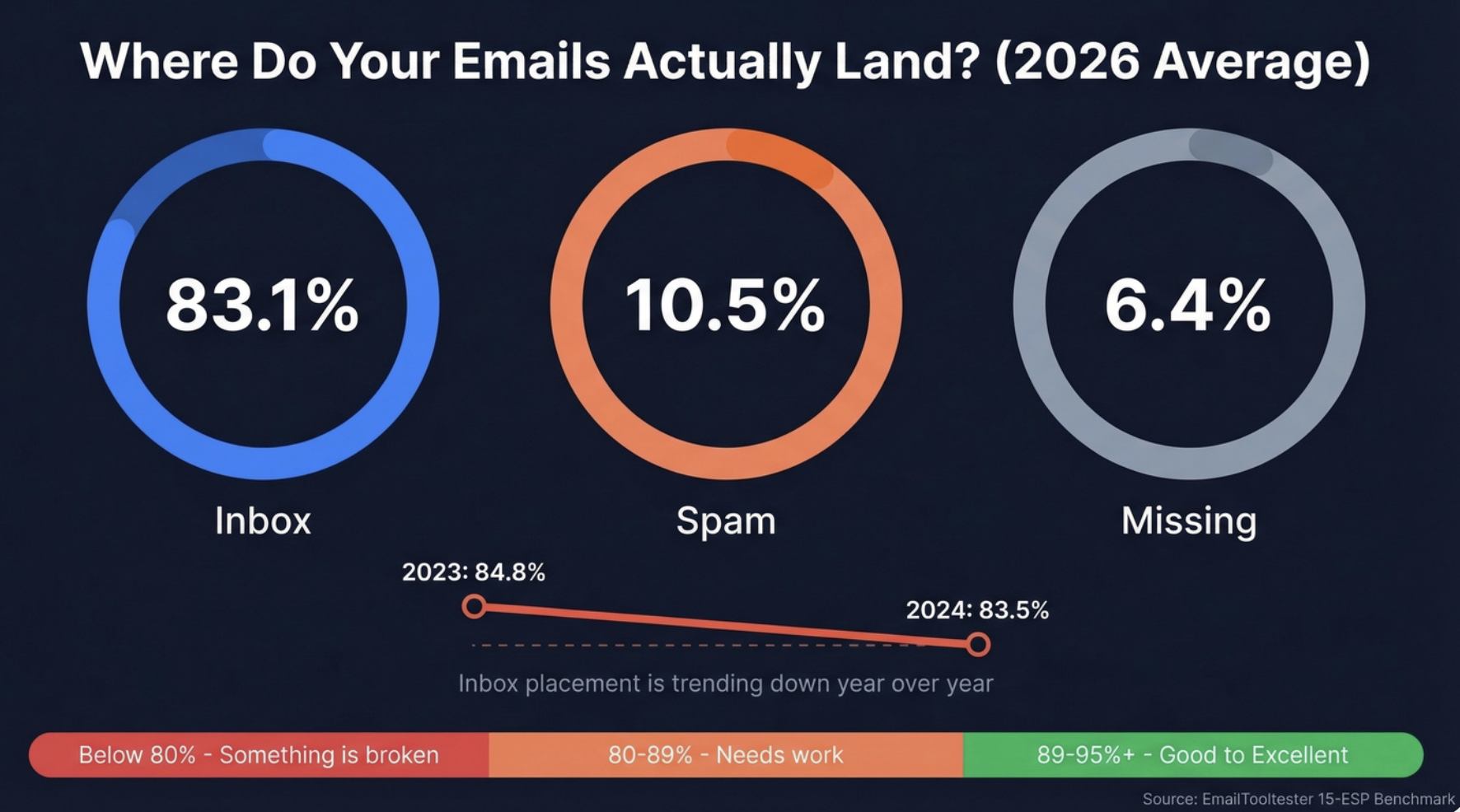
For influencer outreach, where your list is by definition not opt-in and every email needs to feel personal, using an ESP is a double loss: you risk account termination, and the emails that do go out rarely land in the primary inbox.
Why Gmail Is the Best Channel for Influencer Outreach
Gmail is built for one-to-one communication from a real person. That's exactly what influencer outreach needs to look like. The creator you're contacting doesn't want a polished HTML template from "marketing@brand.com" - they want a human message from someone on your team asking about a partnership.
Here's why Gmail wins for influencer outreach specifically:
It doesn't require opt-in. Gmail is your inbox. Sending a personal, relevant email to a public business address from your own Gmail account is not bulk marketing. It doesn't fall under the same policy framework as ESPs.
It has the best inbox placement for Gmail recipients. Creator emails overwhelmingly live on Gmail. Gmail-to-Gmail delivery benefits from Google's own trust signals, and emails sent from a Workspace account with proper authentication (SPF, DKIM, DMARC) routinely hit the primary inbox.
It looks personal. There's no "sent via Mailchimp" footer. Just an email from a human at your company, which is how influencer relationships should start.
Sender reputation is under your control. Your Workspace domain reputation is built by your behavior. Treat it properly and you can run outreach at reliable volume for years.
Understanding Gmail's Sending Limits
Gmail caps how many recipients you can contact per day. These limits exist to prevent spam and protect user inboxes, and knowing them is critical for planning campaigns.
- Personal Gmail (@gmail.com): 500 recipients per day
- Google Workspace (paid): 2,000 external recipients per day per user
- Google Workspace (free trial): 500 recipients per day
Those are just guidelines for what is permitted. Practically speaking, however, the "safe number" is less than those numbers when it comes to sending cold email to individuals with whom you have no prior relationship. A number of deliverability experts suggest that the maximum number of emails that can safely be sent from an inbox (regardless of whether the recipient has previously heard from you) is somewhere around 25-50 messages per day.
If you send significantly beyond this threshold from a single inbox, you'll begin to see patterns identified by Google's algorithms as indicative of "bulk mail," which may cause placement problems even if you remain below the published limits.
With that, when it comes to scaling - do not attempt to send 2000 emails all at once from one Workspace mailbox. Rather, scale using many inboxes and distribute your sends during the course of a given day. For example, if you want to send 500 outreach emails each day, that would translate into approximately 10-20 inboxes sending at safe levels, rather than trying to send at the maximum level possible from a single inbox.
Also critical: as of Google's 2024 bulk sender requirements, you must have SPF, DKIM, and DMARC properly configured on your sending domain. Without these, your emails will be rejected or filtered regardless of volume.
YAMM: The Easiest Way to Send Mass Personalized Emails From Gmail
If you want to run mass email campaigns through Gmail without building your own infrastructure, YAMM (Yet Another Mail Merge) is the most popular tool for the job. It's a Google Workspace add-on that sends personalized bulk emails from your Gmail account, using a Google Sheet as the source of truth for your recipient list.
How YAMM Works
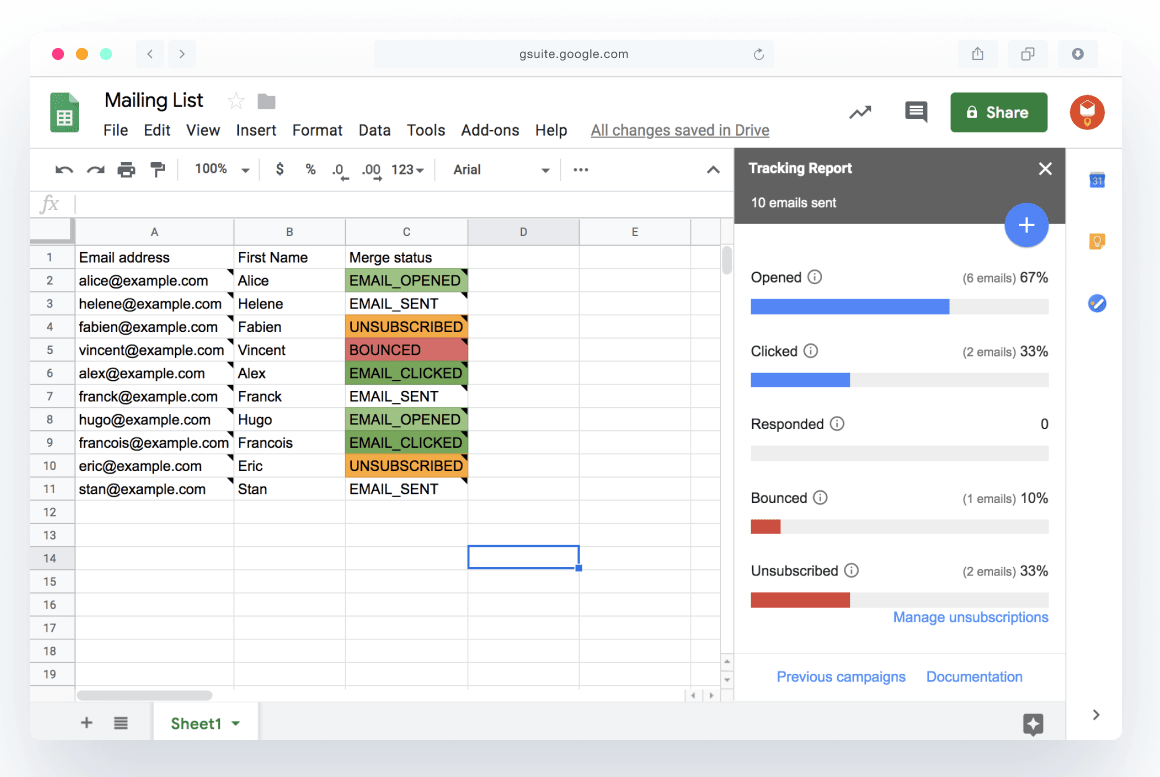
YAMM lives inside Google Sheets. You put your influencer list in a sheet: names, emails, Instagram handles, audience size, whatever variables you want to personalize on, then draft your message as a Gmail draft with merge tags like {{first_name}} or {{handle}}. YAMM pulls each row from the sheet, replaces the tags, and sends the email from your Gmail account. Because each email is a discrete send from your actual Gmail, it lands with the deliverability of a one-to-one message, not a bulk blast.
What YAMM Is Good At
- Native Gmail sending. Emails go through your own Gmail, so they inherit your sender reputation and hit the primary inbox at much higher rates than ESP sends.
- Personalization at scale. Any column in your Google Sheet becomes a variable. You can personalize subject lines, body copy, links, and even attachments per recipient.
- Real-time tracking in Sheets. YAMM writes open, click, bounce, reply, and unsubscribe status back into your spreadsheet as each email lands.
- Gmail draft integration. Since you compose in Gmail itself, you can use saved templates, attach files, add a signature, and send using any alias configured on your account.
- Follow-up segmentation. After a campaign, YAMM can filter your list to just non-openers or non-responders, letting you send targeted follow-ups without rebuilding segments.
YAMM's Limits
YAMM's daily sending cap is tied to Gmail's underlying limits:
- Free plan: around 20 recipients per day
- Personal plan (Gmail accounts): up to 400 recipients per day
- Professional plan (Google Workspace): up to 1,500 recipients per day
These caps reflect Google's own limits, not restrictions YAMM could lift. For most influencer outreach teams running from a single inbox, 1,500 per day is far more than you should actually send from one mailbox if you want good deliverability, so YAMM's ceiling isn't usually the bottleneck.
YAMM is an excellent fit for smaller teams, agencies running one or two outreach accounts, or anyone starting out. It's simple, affordable, and built on the right foundation (Gmail). What it doesn't handle well is multi-inbox rotation, deliverability monitoring, or CRM-style tracking of ongoing influencer relationships, which is where a dedicated platform starts to matter.
Cloutboost Portal is one option built for this layer: it integrates directly with Gmail, so outreach still sends from your own inbox with your sender reputation, but the tracking, campaign management, and creator CRM sit on top.
Warming Up Your Inboxes Before You Send
With the Gmail limits we covered above and a target volume of 3,000–5,000 creators per campaign, you won't be able to accomplish this from a single inbox. You'll need several, probably 5 to 10, depending on how fast you want to move.
But be careful with new Gmail accounts. If you create a brand-new inbox and then immediately blast out 500 Steam Keys to creators on day one of your campaign, Gmail will identify your account as a spammer and place your entire campaign into the SPAM/JUNK folder. New inboxes must therefore undergo an initial "warm-up" period.
Warm-up is how you build a sending history on a new inbox so Gmail learns to trust it before you send a single real outreach email. Warm-up tools like Lemwarm or Smartlead handle this in the background, they send small batches of email back and forth between a network of real inboxes, reply to them, and mark them as important. By the time you start real outreach, your domain looks like a normal person sending normal mail.
Plan for 2-4 weeks of warm-up before your first real send. Day one starts around 5-10 messages and ramps up gradually from there. Once your real campaigns go live, leave the warm-up running: the moment you stop generating positive engagement signals your reputation can start sliding, especially if a live campaign throws off bounces or complaints.
Verifying Your List to Avoid Bounces
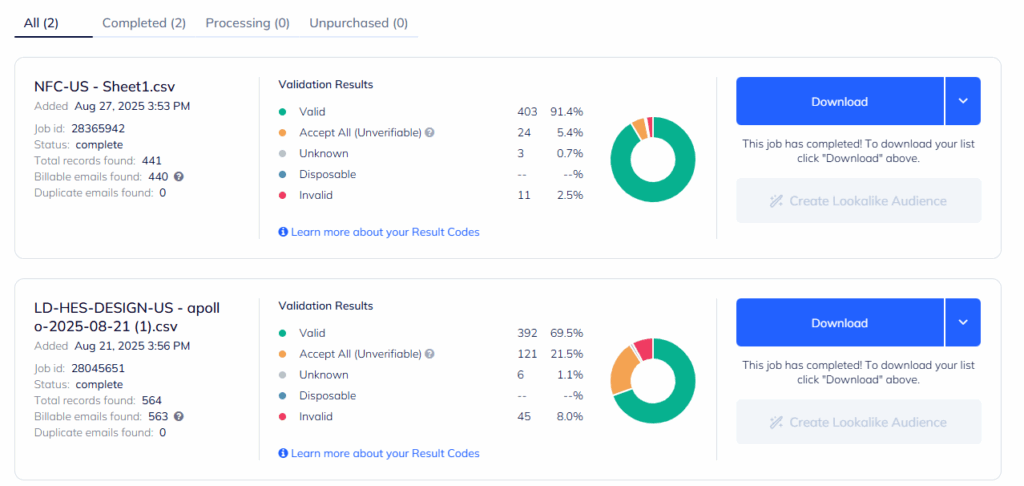
Once your inboxes are warmed up, make sure you're not sending to a “dirty” list. If there is a 10% bounce rate in a single send that is enough to ruin a sender reputation you built over weeks. Bounces are watched very carefully by Gmail because bounces are an obvious indicator of a list that has either been scraped or hasn't been used recently. If you send out 2 campaigns that both result in a high number of bounces then all of your emails start going straight to junk even though some of the creators would have definitely read your email.
This matters more for influencer outreach than almost any other use case. Your list didn't come from a CRM with opt-ins. It came from scraping Instagram, TikTok, and YouTube bios, plus a creator database or two. It’s safe to assume that a portion of these addresses are either abandoned, misspelled, set up with catch-all domains or tied to handles that haven’t been checked since the creator quit using them two years ago. Even if your list was good six months ago, it’s not good now. Email addresses depreciate at about 22-30% per year as people create new handles or simply stop using their email account.
Email verification tools fix this before you send. They run each address through a few checks: that the syntax is valid, that the domain exists with proper MX records, that the SMTP server actually accepts mail at that address. They also flag disposable addresses, role-based addresses like info@ or contact@, and known spam traps. And they'll identify catch-all domains, which is the gray area where SMTP checks can't really give you a definitive yes or no.
Run your list through a verification tool like ZeroBounce or NeverBounce before every campaign. Most of them claim 95 to 99 percent accuracy. The real differences are how they handle catch-alls and how the cost scales when you're verifying 5,000 creators at a time.
Best Practices for Scaling Influencer Outreach Through Gmail
Launching a game has a hundred things that can go wrong. Influencer outreach shouldn't be one of them. Here's the short list of things to get right so deliverability isn't what tanks your campaign:
1. Authenticate your domain. Set up SPF, DKIM, and DMARC on your sending domain before you send your first outreach email. Google requires it for bulk senders now, and it's the single biggest deliverability lever you have.
2. Warm up new inboxes. 2 to 4 weeks per inbox, ramping gradually, and keep the warm-up running in the background once campaigns go live.
3. Send at human volumes. Cap each inbox at 25 to 50 cold emails per day. If you need more capacity, add inboxes. Don't push the ones you have harder.
4. Verify your list. Run it through a verification tool before every campaign, not just the first one. Lists go stale faster than you'd think.
5. Personalize beyond first name. Reference a specific video, a recent brand deal, or why this creator specifically fits your game. "I love your content!" openers get ignored and trained as spam, which trains Gmail to treat your future emails the same way.
6. Spread sends across the day. Don't fire 500 emails at 9 AM. Pace them across business hours so it looks like a person sending email, not a script.
7. Drop inactive contacts. If a creator hasn't opened anything from you in a year, stop emailing them. Sending to people who never engage damages your reputation faster than almost anything else.
8. Make unsubscribing easy. Even for cold outreach, include a one-line opt-out at the bottom. Something like "Just reply 'no thanks' if you'd rather not hear about partnerships and I'll take you off the list." It cuts spam complaints, and Gmail cares about spam complaints more than almost any other signal.
The Bottom Line
For influencer outreach specifically, Gmail isn't just a good choice, it's really the only choice that works. ESPs will ban your account for the exact use case you need them for. Gmail, by contrast, was built for personal messages from real people, which is exactly what influencer outreach should look like.
Start with Gmail as your sending foundation. Use YAMM if you need a lightweight mail merge layer, or specialized platform that plugs into Gmail natively. Authenticate your domain, warm up your inboxes, keep daily volumes sane, and personalize like a human.


Related articles you may also like
Reddit for Game Developers: The Complete Guide
Top Gaming Marketing & PR Agencies for Video Game Publishers


Request a Free Strategy Session
Discover how Cloutboost can boost your video game's success with our Influencer Marketing Services.